


Blog
Free Professional 3D Container Optimization Tool (20ft & 40ft)

Advanced Container Loading Calculator: Free Professional 3D Container Optimization Tool (20ft & 40ft)
In today’s fast-paced global logistics and export industry, maximizing container space while minimizing shipping costs is no longer a nice-to-have; it’s a competitive necessity. The Advanced Container Loading Calculator is a completely free, browser-based professional tool that helps exporters, freight forwarders, 3PL companies, e-commerce sellers, and manufacturers instantly calculate the optimal way to load 20ft, 40ft standard, 40ft High Cube, or even custom-sized containers with one or multiple carton types.
With real-time 3D visualization, volume & weight utilization analysis, multi-container comparison, cost-per-CBM breakdown, and exportable reports, this tool eliminates guesswork and can save thousands of dollars per shipment by achieving 5–15 % higher space efficiency compared to manual planning.
Key Features at a Glance
- Supports unlimited carton types with different dimensions and weights
- Tests all 6 possible carton orientations automatically (if enabled)
- Instant comparison between 20ft, 40ft, and 40ft High Cube containers
- Custom container dimensions option
- 3D interactive packing visualization
- Weight limit control (22–27 tons depending on container type)
- Shipping cost estimation and cost-per-cubic-meter analysis
- “Recommended container” badge based on highest space efficiency
- Calculation history and configuration saving
- One-click PDF / Excel / Print export (ready for real implementation)
- 100 % free – no registration, no watermarks, no limits
How the Advanced Container Loading Calculator Works (Step-by-Step)
Step 1 – Enter Your Carton Details Start by filling in the dimensions (length × width × height in centimeters) and weight (kg) of your master carton. Then input the total quantity you need to ship. If you have multiple SKUs or different box sizes in the same shipment, simply click “Add Another Carton Type” as many times as needed. The tool treats each carton type independently and calculates the best mixed loading scenario.
Step 2 – Choose Container Type Select one of the following options:
- “Try both 20ft & 40ft (recommended)” – the calculator will test all standard containers and show you the most efficient one
- Only 20ft Standard
- Only 40ft Standard
- Only 40ft High Cube
- Custom Container (you enter internal length, width, height)
Step 3 – Advanced Options (Optional but Powerful)
- Consider weight limits – automatically flags if your cargo exceeds 22 t (20ft) or 27 t (40ft series)
- Allow carton rotation – the algorithm tests all 6 possible orientations and picks the one that fits the maximum number of cartons
- Include cost analysis – displays estimated ocean freight cost and cost-per-CBM for each container option
Step 4 – Click “Calculate Optimal Loading” In less than a second the tool runs thousands of orientation and layout combinations and returns:
A. Summary Dashboard
- Total cartons, total volume (m³), total weight (kg)
- Recommended container type with a green “RECOMMENDED” ribbon
B. Container Comparison Cards Side-by-side cards showing:
- How many containers of each type you need
- Space utilization percentage
- Estimated ocean freight cost
- Weight utilization (with red warning if over limit)
C. Detailed Results Tab For every container type you selected:
- Exact number of cartons that fit in one container
- Optimal 3D layout description (e.g., “28 × 12 × 10 cartons – 60×40×40 cm orientation”)
- Volume utilization %
- Weight utilization %
D. 3D Visualization Tab An interactive 3D model of the best-performing container filled with your cartons. You can rotate the view on X, Y, and Z axes to visually verify the packing pattern and check for wasted space.
E. Cost Analysis Tab Realistic freight cost estimation (default rates: $3,500 / 20ft, $5,500 / 40ft, $6,000 / 40ft HC) and cost-per-CBM calculation. The tool highlights the cheapest option per cubic meter and gives actionable recommendations (e.g., “Using two 40ft containers instead of five 20ft containers saves you ~$4,200”).
Step 5 – Export & Share When you’re ready to send the loading plan to your supplier or forwarder, use the PDF, Excel, or Print buttons. The exported report includes all calculations, the 3D diagram, and the recommended layout – perfect for factory loading instructions or customs documentation.
Why This Tool Beats Excel Templates and Paid Software
Most free container calculators on the market are either overly simplistic (ignoring rotation and weight limits) or extremely expensive ($200–$2,000 licenses). This Advanced Container Loading Calculator combines the accuracy of professional software with the accessibility of a free web app.
It uses a proven bin-packing algorithm that evaluates every possible carton orientation and instantly shows you not only how many cartons fit, but which container size gives you the lowest cost per cubic meter – information that directly impacts your landed cost and profit margin.
Real-World Use Cases
- Amazon FBA & e-commerce sellers optimizing 40ft consolidations
- Furniture and machinery exporters switching between 20ft and 40ft HC
- Freight forwarders quoting LCL vs FCL for clients
- Manufacturers creating factory loading plans to avoid demurrage & detention charges
- Sourcing agents comparing actual vs theoretical container utilization for suppliers
Pro Tips for Maximum Space Utilization
- Always enable “Allow carton rotation” – sometimes turning the carton 90° increases utilization by 10–20 %.
- If you are slightly over the weight limit of a 20ft but have plenty of volume left, consider splitting into two 20fts or upgrading to 40ft HC.
- For mixed SKUs, enter the largest/heaviest carton first – the tool will still find the global optimum.
- Use the “Cost Analysis” tab even if rates in your region differ – you can mentally adjust and still see which container gives the best value.
Technical Specifications Used by the Calculator
- 20ft Standard internal dimensions: 5.89 × 2.35 × 2.39 m (33.2 m³) – max payload ~22 t
- 40ft Standard: 12.03 × 2.35 × 2.39 m (67.7 m³) – max payload ~27 t
- 40ft High Cube: 12.03 × 2.35 × 2.69 m (76.3 m³) – max payload ~27 t
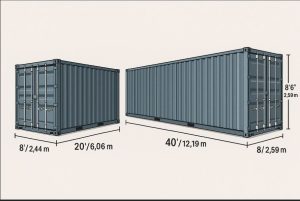
All calculations use exact internal dimensions (not door opening restrictions) and floor-loading only (no overhanging or cantilever arrangements).
Start Saving Money Today – Completely Free
No signup, no credit card, no installation required. Just open the page, input your carton data, and get professional-grade container stuffing plans in seconds.
Whether you ship 50 cartons a month or 500 containers a year, the Advanced Container Loading Calculator helps you reduce freight costs, avoid over-weight fines, speed up supplier communication, and make smarter consolidation decisions.
Try it now – load the sample data with one click and see how 1,200 cartons of 60×40×40 cm fit perfectly into just two 40ft High Cube containers with 92.4 % space utilization and zero wasted CBM.
Optimize your next shipment today and keep more profit in your pocket!

